
EasyGold: Money management & risk settings
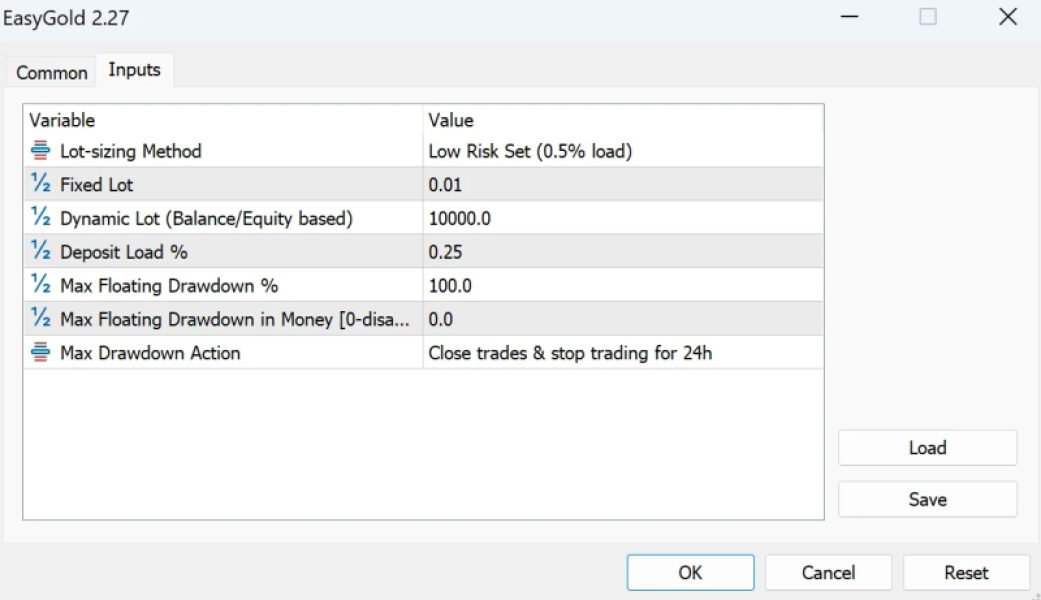
Once you load EasyGold on your chart, a pop-up box will appear displaying the settings of your EA. Make sure all the settings and alerts are configured correctly before clicking OK.
- Lot-sizing Method: Select the lot-sizing method based on the level of risk you want to take:
- Fixed Lots: Uses a fixed lot size specified in the "Fixed Lot" parameter.
- Dynamic Lots: Uses the "Dynamic Lot" parameter to adjust lot size.
- Deposit Load: Calculates lot size based on a percentage of the deposit load.
- Predefined Presets: Automatically calculates risk for you with one of four predefined risk levels.
- Fixed Lot: The fixed trading lot size for the initial trade.
- Dynamic Lot (Balance/Equity-based): The portion of balance or equity allocated per 0.01 lot.
- Deposit Load %: The percentage of your deposit that will be used to open the initial trade.
- Max Floating Drawdown %: If the floating drawdown exceeds this specified percentage, the EA will close all open positions.
- Max Floating Drawdown in Money [0-disabled]: If the floating drawdown exceeds this specified monetary value, the EA will close all open positions.
- Max Drawdown Action: Defines the actions to be taken once the maximum drawdown is reached, whether specified in money or as a percentage.