
EasyNews: Parameters
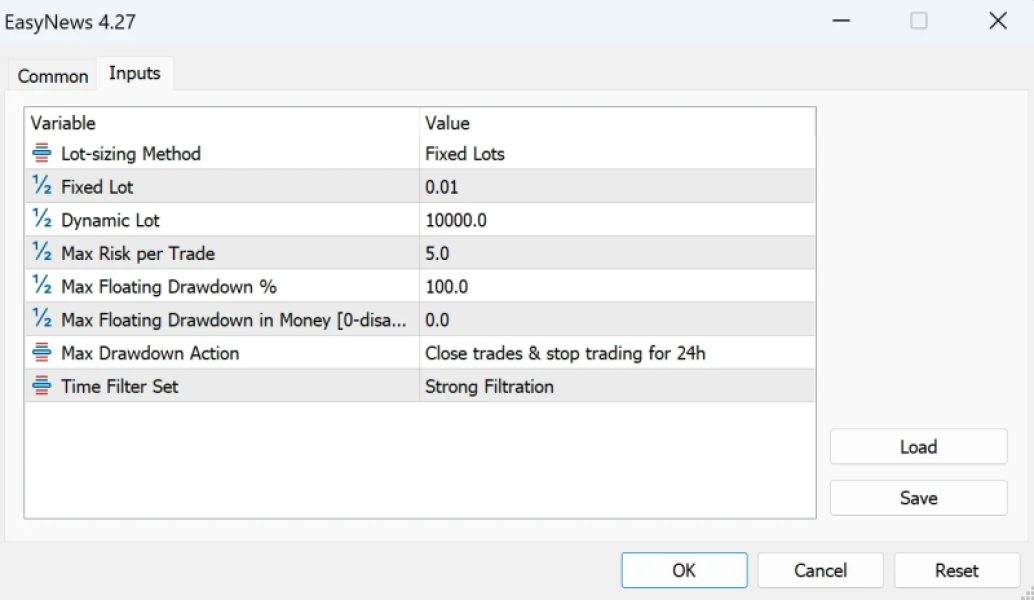
Once you load EasyNews on your chart, a pop-up box will appear displaying the settings of your EA. Make sure all the settings and alerts are configured correctly before clicking OK.
- Lot-sizing Method: Select the lot-sizing method based on the level of risk you want to take:
- Fixed Lots: Uses a fixed lot size specified in the "Fixed Lot" parameter.
- Dynamic Lots: Uses the "Dynamic Lot" parameter to adjust lot size based on balance or equity.
- Max Risk per Trade: Calculates lot size to ensure the risk per trade remains within the specified percentage.
- Predefined Risk Presets: Automatically calculates risk for you.
- When you choose a specific method, only the relevant parameters apply. For example, if you select Dynamic Lots, you should set the "Dynamic Lot" parameter. Adjusting "Fixed Lot" or "Max Risk per Trade" will not affect the outcome. Similarly, when selecting a predefined risk profile, all three parameters below become irrelevant.
- Fixed Lot: A fixed trading lot size. If you want all trades to use the same fixed lot size, select Fixed Lots in the 'Lot-sizing Method' and specify the desired lot size here.
- Dynamic Lot: The portion of balance or equity to be used per 0.01 lot. For example, if you want a 0.01 lot size for every $100 of your deposit, select Dynamic Lots in the 'Lot-sizing Method' and set 100 in the 'Dynamic Lot' parameter.
- Max Risk per Trade: Calculates lot size so that the risk per trade stays within a specified limit. For instance, setting this parameter to 5 will ensure that all trades risk a maximum of 5% of the deposit in the event of a stop-loss (SL).
- Max Floating Drawdown %: If the floating drawdown exceeds this specified percentage, the EA will automatically close all open positions.
- Max Floating Drawdown in Money [0-disabled]: If the floating drawdown exceeds this specified monetary value, the EA will automatically close all open positions.
- Max Drawdown Action: Defines the actions to be taken once the maximum drawdown is reached, whether specified as a percentage or monetary value.
Time Filter set: this is a new input. Don't know what it is.